I run a single VPS with k3s. It serves a handful of public sites and a few admin tools, and Pulumi manages all of it. This post describes how the box is protected, followed by the problems I found while checking that the protection actually works.
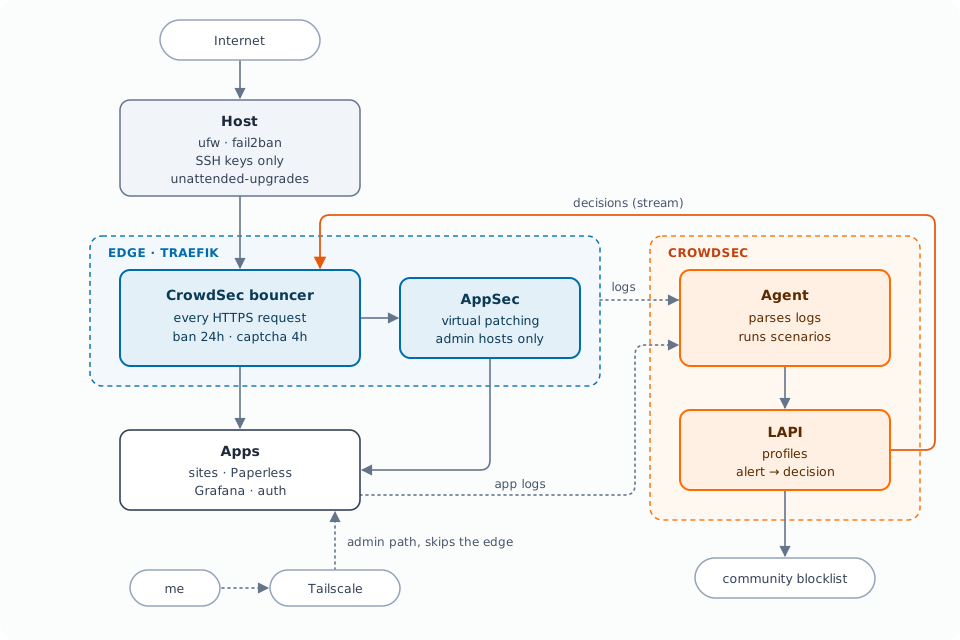
The layers
Host
- SSH with keys only, no root login.
- ufw denies inbound traffic by default and opens a short list of ports.
- fail2ban watches SSH.
- unattended-upgrades installs security updates daily. No automatic reboot: on a single node I pick the moment myself.
One entry point for HTTP
All web traffic goes through Traefik and the Gateway API. Every public hostname has its own Let’s Encrypt certificate and its own listener. There is no other way into the cluster from the internet, so this is where filtering happens.
CrowdSec at the edge
- Agent: reads container logs (Traefik access log plus selected apps) and runs scenarios on them: probing, crawling, known CVE paths, brute force.
- LAPI: turns alerts into decisions and exchanges signals with the community blocklist.
- Bouncer: a Traefik plugin attached to the HTTPS entrypoint as a default middleware, so every request on every host passes through it. It pulls decisions in stream mode instead of asking the LAPI per request.
Profiles decide what an alert turns into:
| Signal | Decision | Duration |
|---|---|---|
| Brute force, AppSec repeat offenders, community blocklist | ban | 24h |
| Probing, crawling, CVE scans | hCaptcha | 4h |
Probing scenarios have false positives. A person who trips one can solve a captcha, a scanner can’t. Cluster-internal ranges and the server’s own IP are allowlisted.
AppSec where it pays off
CrowdSec’s AppSec component inspects request bodies with virtual patching and OWASP CRS rules. I don’t apply it globally: CRS produces false positives on legitimate payloads like audio uploads, OCR documents and GraphQL bodies. Only the admin hosts opt in, through a middleware referenced from their HTTPRoute.
App logs for what the proxy can’t see
A failed Paperless login returns HTTP 200 with a form error. In the access
log that’s a successful request. The agent therefore also parses the Paperless
and Grafana logs with their hub collections (andreasbrett/paperless-ngx,
LePresidente/grafana). Both apps log the real client IP. With proxy IPs in
the log, every event would hit the allowlist.
A private admin path
The admin UIs are also reachable over Tailscale. That path goes straight to the service and skips the public edge. It’s also my way back in if I ban myself.
Monitoring
VictoriaMetrics scrapes CrowdSec. Telegram alerts fire when the LAPI is down, parsers fail, or a log source goes silent.
Gotchas
Logs read but never parsed
An acquisition entry looks like this:
- namespace: paperless
  podName: web-*
  program: paperless
Parsers filter on program. No parser matched paperless, so every line was
read, counted in the metrics and dropped. The hub parser expects
paperless-ngx.
cscli explain checks a parser against a real line without any traffic:
cscli explain --type paperless-ngx \
  --log '[2026-10-26 10:27:18,601] [INFO] [paperless.auth] Login failed for user `x` from IP `203.0.113.7`.'
It lists every stage and the scenarios that would fire.
Profiles filter on scenario names
My ban profile matched crowdsecurity/appsec-virtual-patching. That’s the AppSec
config, not a scenario. The scenario for repeat offenders is
crowdsecurity/appsec-vpatch. AppSec blocked every bad request, but repeat
offenders were never banned.
Counting decisions per scenario shows it:
cscli alerts list --since 168h -l 0 -o json \
  | jq -r '.[] | "\(.scenario) decisions=\((.decisions//[])|length)"' \
  | sort | uniq -c | sort -rn
348 crowdsecurity/vpatch-CVE-2025-29927 decisions=0
131 crowdsecurity/vpatch-env-access     decisions=0
 12 crowdsecurity/http-probing          decisions=1
A high count with decisions=0 means no profile matches. Take scenario names
from this output, not from collection names.
Agents stuck after a reboot
After a node reboot the agent and AppSec pods restart in place and keep their
names. The init container runs cscli lapi register --machine <pod-name> again
and the LAPI answers 403 user already exist. It retries forever.
The credentials from the first registration are still in the pod’s emptyDir,
which survives a reboot. A Helm post-renderer patches the init command to fall
back to them:
... && cp /etc/crowdsec/local_api_credentials.yaml /tmp_config/local_api_credentials.yaml \
  || test -s /tmp_config/local_api_credentials.yaml
Pulumi’s helm.v3.Release takes a postrender argument, so the patch lives in
code.
Stale series after a rollout
CrowdSec keeps a cs_filesource_hits_total series for every file it has read.
The path contains the pod name, so after a rollout the old pod’s series stays at
rate 0 and a “no log ingestion” alert fires. Joining on kube_pod_info limits
the alert to pods that still exist:
(sum by (stable_source, namespace, pod) (
  label_replace(label_replace(label_replace(
    rate(cs_filesource_hits_total[10m]),
    "stable_source", "$1", "source", `(.*)-[0-9a-f]{64}\.log$`),
    "pod", "$1", "source", `/var/log/containers/([^_]+)_.*`),
    "namespace", "$1", "source", `/var/log/containers/[^_]+_([^_]+)_.*`)
) == 0) and on (namespace, pod) kube_pod_info
Test from outside
Because of the allowlist, tests from the server or the cluster prove nothing. I used my phone on mobile data: six failed Paperless logins within 20 seconds. The scenario fired, the profile issued a 24h ban, and after the next bouncer pull the phone got the ban page.
Recovery is one command on the server:
cscli decisions delete --ip <ip>
Have a way in that doesn’t pass the bouncer before you try this.